
The Candy AI image generator works in two places: in a chat, where you press Image under "Show me the scene" and the character sends a picture of the current moment, and in a separate Generate Image tool in the sidebar. A free account gets one image in total. After that every image draws on tokens, 18+ images are a Premium benefit, and Candy AI doesn't publish what a single image costs.
People searching for Candy AI images, or candy.ai images, usually want three answers: how you get a picture, what it costs and what is allowed. This guide uses Candy AI's help center, public chat pages, plans page and terms, read on October 2, 2026, plus September 2026 screenshots of a free account. We haven't used the generator with a paid account; where Candy AI publishes nothing, we say so.
Two ways to get Candy AI images
The first is the chat. Under the message box of a ready-made character, Candy AI shows the words "Show me the scene" with two buttons, Image and Video. Creator profiles phrase it differently: an Ask button with starters such as "Send me…", "Show me…" and "Can I see…", plus a two-step guide called "How to Prompt for Images". Either way, the picture arrives inside the conversation.
The second is the generator itself, the "Generate Image" entry in the sidebar. For a visitor who isn't signed in, that address simply sends you back to the homepage, so its options aren't public. The homepage pitches it as "Outfits, backgrounds, poses—it's like staging a shoot", and the site's code prices a request as the number of images times a per-image cost that guests never see. The help center counts both routes against the same allowance: a free user gets "one image (either via the image generator or directly in chat)".

How asking for an image in chat works
- Open a chat with a ready-made character, a creator twin or a character you built yourself in the character creator.
- Set the scene in the conversation. The picture is drawn from what is happening in the chat, so there is no separate prompt box to fill in.
- Press Image under "Show me the scene", or use the Ask button on a creator profile.
- Wait a few seconds. In the September 2026 screenshots, a progress line read "Mona is sending a photo" with a percentage and the note "This might take a few seconds", and the button showed "Generating…" until the picture landed, about ten seconds later.
- The image arrives as a message in the thread. If the picture is suitable, the help center says you'll get the option to convert it into a short video, covered in the video generator guide.
What comes back, and where it is kept
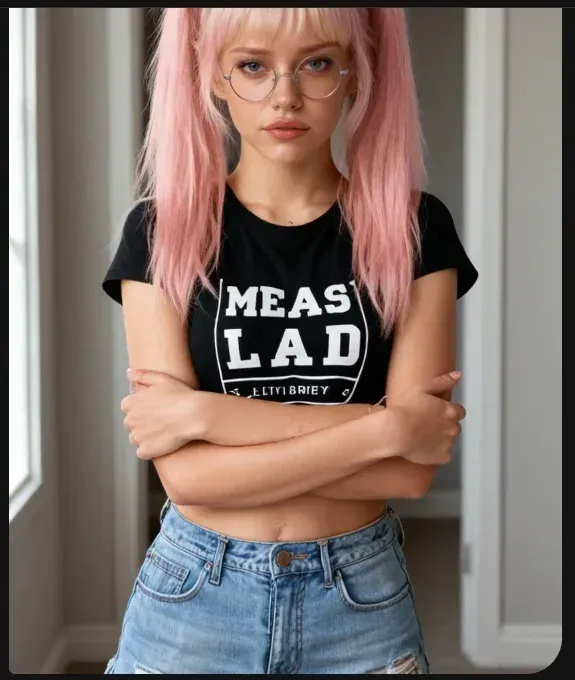
The September 2026 screenshots show the result: one image in the thread, presented as if the character had sent it rather than as a download. Notes from that session say the picture followed the conversation without any prompt being typed and kept the character's look from the profile photo. That likeness is the main reason to use Candy AI's generator rather than a general image tool.
Everything you make stays in your account. Deleting the chat message doesn't delete the picture: the chat page warns that the image stays "still visible in your gallery". What that area is called depends on which Candy AI page you read. The sidebar says Collection, the footer says Gallery, the Build Your Video help article says My Generations and the cams page says My Collections. Guests can't open it, so we can't describe its layout; the Private Content guide sums up what is documented.
Free account, Premium and tokens
| Free account | Premium | Tokens | |
|---|---|---|---|
| How many images | One in total, in chat or the generator | As many as your tokens cover | Every image draws on your balance |
| 18+ images | Not in the free allowance | "Generate 18+ Images" | Per image; the cost is not published |
| Tokens included | None listed | 100 a month (330 on Premium Plus) | More at candy.ai/tokens, after sign-in |
| Image Generation Toggle | Not offered | Yes, on by default | No in-chat image tokens spent while off |
| Blur on creator profiles | At least some images, judging by the upsell | "Remove image blur" | — |
The blur row needs a caveat. The upgrade box on creator twin profiles lists "Remove image blur" among its Premium perks, so free accounts see at least some images blurred there. Candy AI doesn't say whether that also applies to its own ready-made characters, and in September 2026 the free in-chat image shown above arrived in full, without blur or a watermark. Treat that as a past observation, not a promise.
Premium itself costs $3.99 a month on the annual plan (billed $47.88), $8.99 a month quarterly ($26.97) or $13.99 month to month. The plan unlocks 18+ output; the tokens are what limit how many images you make. The full free allowance is in is Candy AI free?
What a Candy AI image costs in tokens
Candy AI doesn't publish a per-image price on any page a guest can read. The help center is clear that images need a token balance even if you subscribe: regular chatting doesn't cost tokens, but images, videos, voice and Private Content packs do. Paid users get 100 tokens a month "for image generation, video generation, creating custom AIs, and more", credited on the subscription date each month, yearly subscribers included.
The only per-image number on the public site is a narrow one. In the character creator's page code, a prompt for characters upgraded to an "NSFW Image Engine V2" says: "After upgrading, generating an image with this character will cost 4 tokens." That describes one upgrade path, not a general price list, so don't build a budget on it. Token packs are sold at candy.ai/tokens, which only opens after sign-in. The one official dollar reference is the referral program, which calls 200 tokens "a $20 value", roughly 10 cents a token as a ballpark.
Remember that images share one balance with everything else. The same 100 tokens pay for video, voice messages, calls and, inside candy.ai, Shorts episodes after the free pair (12 tokens each, 30 on creator series). Plans, tokens and renewals are broken down in the Candy AI price guide.
Controlling when images appear
Two settings decide whether pictures turn up in a chat, and both affect your token balance:
- Image Generation Toggle (Premium). It sits in the Ask button's dropdown on desktop and mobile, is on by default and keeps your setting between sessions. Turned off, it removes the "Show me…", "Send me…" and "Can I see…" prompts, and the help center says no tokens are used while it is off.
- Realistic mode. Characters in this mode send photos, voice notes and videos at random times without being asked. Its toggles sit behind the icon next to the gift icon at the bottom of the chat.
- No intensity slider. Candy AI says it has no "chat intensity" setting. Tone is steered through your messages, roleplay instructions and the character's description.
The chat side of these settings, including memory and voice, is covered in the Candy AI chat guide.
Getting better results
Candy AI's help article on image results keeps its advice short: be descriptive, say what the image is for, and ask for specific poses. It also names two weak spots: very complex prompts, and keeping hair or clothing consistent from one image to the next. In chat, where the conversation is the prompt, the practical version is to make the scene clear in the messages just before you press Image, and to change one thing at a time when a result misses.
The rules: what you can't generate
The same help article says users "may also generate adult/NSFW content that complies with our Community Guidelines", and Premium sells "Generate 18+ Images". Several things are still banned whatever your plan or settings. We classify rather than describe:
- Real people. The Community Guidelines bar creating, publishing or sharing "images that resemble real persons", and the Blocked Content Policy has a zero-tolerance rule on images "intended to resemble actual persons", including deepfakes and celebrity impersonation. The only real likenesses on Candy AI are the licensed creator digital twins, made with each creator's consent.
- Anything resembling minors, which the Blocked Content Policy bans outright.
- Non-consensual imagery, self-harm, animal abuse and drug material, plus attempts to "jailbreak" the service.
Moderation is active. If Candy AI's controls flag something, the company or authorized partners may review it manually, and decisions to close an account for policy violations are made by people. Anyone who believes an image resembles them can ask for removal under the Content Removal Policy. The full rulebook is in Candy AI NSFW rules.
Sharing and privacy
Commercial use of generated images is prohibited. Personal, unmonetized posting is allowed for images of your own Create My AI characters, with one exception that catches people out: "Do not post content created via characters featured on the 'Explore' or homepage." In practice, treat pictures of Candy AI's ready-made characters as being for your account only.
On privacy, the terms license what you create to EverAI, including for training its AI models, and the privacy notice says de-identified interactions may be reviewed by people for that purpose. Charges show as "EverAI" on a bank statement. If discretion matters to you, read is Candy AI safe? before you start.
Is the image generator worth it?
For a first look, yes, because it costs nothing: the free image shows you how a conversation turns into a picture. Beyond that, the honest answer depends on a number Candy AI doesn't show guests, the token cost per image, so check what the generator charges once you're signed in before you plan around it. If you mainly want to watch rather than make, the ready-made Shorts series are a cheaper place to start, and the rest of the toolkit is mapped in the Candy AI tools hub.
Frequently asked questions
Is the Candy AI image generator free?
Only for one picture. Candy AI's help center says a free account can generate one image, "either via the image generator or directly in chat". After that every image needs tokens, and 18+ images are listed as a Premium benefit.
How many tokens does a Candy AI image cost?
Candy AI doesn't publish a per-image price to visitors who aren't signed in. The only figure on its public pages is a prompt for characters upgraded to an "NSFW Image Engine V2", saying an image with that character "will cost 4 tokens"; it is not a general price list. Premium includes 100 tokens a month: see the price guide.
Can I stop Candy AI from sending images in chat?
Yes, on Premium. The Image Generation Toggle in the Ask button's dropdown is on by default; switched off, it removes the image prompts and no tokens are spent on in-chat images. Realistic mode, which sends photos, voice notes and videos unprompted, has its own toggles.
Where are my Candy AI images saved?
In your account. Candy AI's own pages call that area Collection, Gallery or My Generations depending on where you look, and deleting a chat message leaves the picture "still visible in your gallery". The page is behind sign-in, so we can't describe it further.
Why are some Candy AI images blurred?
The upgrade box on creator profiles lists "Remove image blur" as a Premium perk, so free accounts see at least some images blurred there. Candy AI doesn't say which ones. In September 2026, an in-chat image on a free account arrived unblurred.
Can I make images of a real person on Candy AI?
No. The Community Guidelines ban images that resemble real persons, and the Blocked Content Policy has a zero-tolerance rule on images intended to resemble actual people. The only real likenesses on the platform are the licensed creator digital twins.
Can I post Candy AI images on social media?
Only personally and without making money from it, and only images of your own Create My AI characters. Candy AI says not to post content created with characters featured on the Explore page or the homepage, and commercial use is prohibited.
Related guides
Chat, images, video, your own characters and Private Content.
Read the guide → How does Candy AI chat work?Five free messages, then unlimited text with Premium; extras cost tokens.
Read the guide → How does the Candy AI video generator work?Image-to-video and preset builds, paid with tokens.
Read the guide → How do you create a character on Candy AI?Help center: one free character; Premium for more; no real lookalikes.
Read the guide →